Context‑Driven AI Prototyping
My Workflow for Building Implementation‑Ready AI Prototypes

Over the past few months, I’ve been refining my approach to using AI tools to create prototypes that aren’t just visually compelling, but implementation ready. Early on, I ran into a recurring challenge: AI‑generated prototypes often look polished, but lack the technical accuracy needed for engineers to meaningfully act on them.
This realization pushed me to evolve my process into what I now call context‑driven prototyping—an approach focused on giving AI enough product context to generate prototypes that reflect real system behavior, data models, and product constraints.
Below is a walkthrough of the workflow I shared with my team, including how I use a product expert agent, how I iterate, and how I bridge the gap between conceptual AI prototypes and the architecture they must eventually align with.
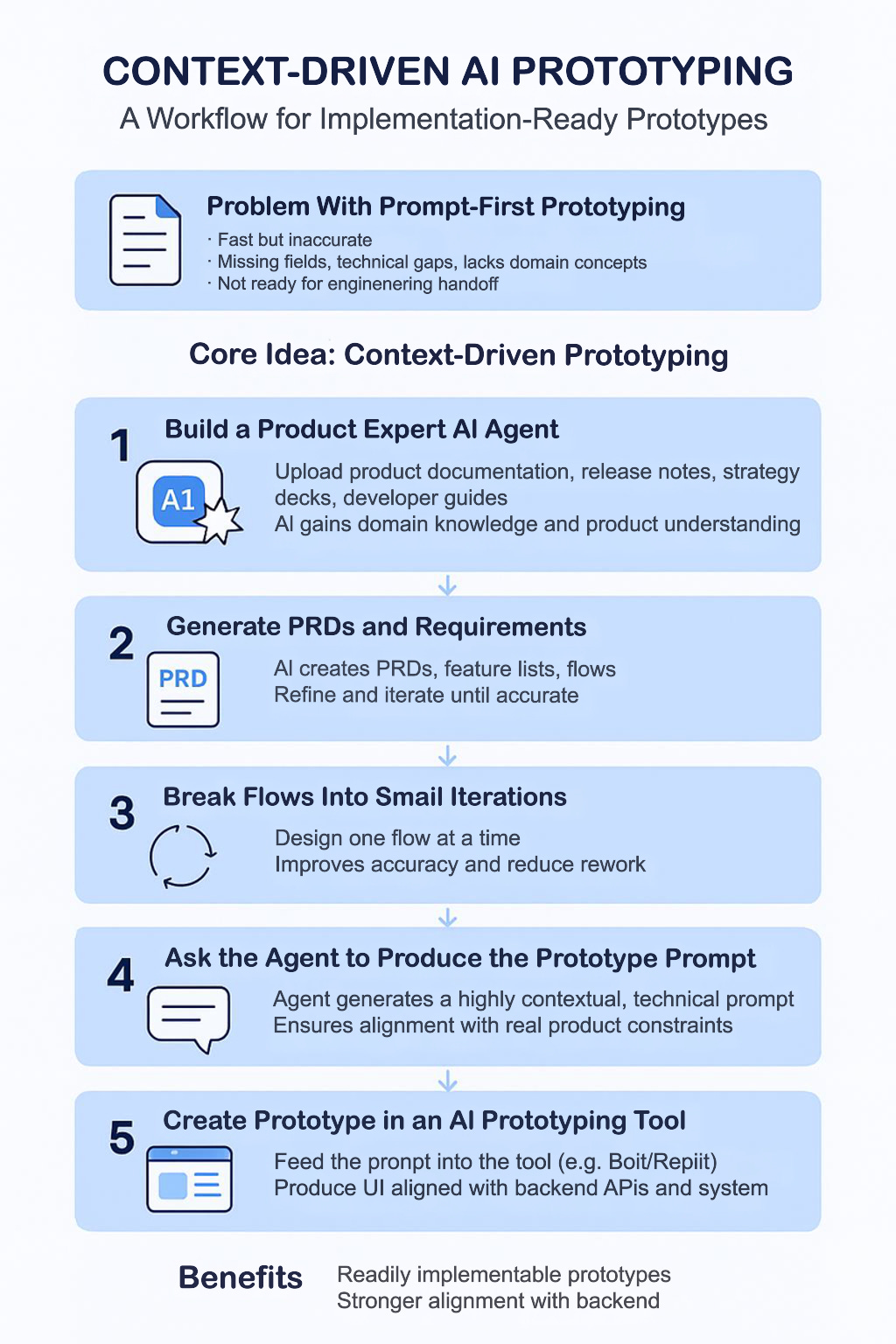
Why Traditional Prompt → Prototype Workflows Fall Short
Most AI prototyping tools follow a simple pattern: Write a prompt → Get a UI.
This is fast and useful for exploration, but it breaks down for complex products or systems. Some of the challenges I consistently encountered:
The prototype lacks technical accuracy
Key inputs or fields are missing
It doesn’t reflect real product behavior or domain logic
It’s not something engineering teams can use
In short: AI didn’t have context. Without grounding, the output was too abstract to move beyond ideation.
The Shift: Context‑Driven Prototyping
To overcome this gap, I changed the workflow entirely:
Instead of asking a prototyping tool to “build me X”, I first build an expert AI agent that deeply understands my product. This agent becomes the foundation for everything that follows.
1. Create a Product Expert Agent
I begin by building a dedicated agent. You can use chatgpt, Microsoft copilot or whatever you prefer - and loading it with all relevant product knowledge including:
Online help docs
Strategy documents and planning materials
Release notes
One‑pagers and overview docs
Developer guides, examples, API references
Any product content that I can consolidate and convert to a PDF
Once trained, this agent understands:
What the product is and what it is not
The problem space and domain
The structure of key workflows
Data models and concepts
Historical decisions and system behaviors
The last releases and product roadmap
Then, I can ask it things like:
“Create a PRD for this feature”
“List all capabilities in this product area”
“Provide a sample API payload for this workflow”
Because it is grounded in real documentation, the outputs are far more accurate.
2. Define and Workshop the PRD Inside the Agent
Before touching any UI prototyping tool, I generate a PRD using this expert agent. Then I refine it to correct inaccuracies, remove assumptions that agent incorrectly added, add any missing details and tighten requirements. This agent becomes the source of truth for downstream references.
Yes, this step it increases time to the first prototype— but it dramatically accelerates downstream conversations.
3. Break the Experience Into Small, Iterative Flows
AI struggles when asked to design a large, complex experience in one pass.
So I break the product experience into smaller, manageable flows.
Each flow becomes its own task.
Small context → Better accuracy → Less rework.
4. Have the Agent Generate the Prototype Prompt
Once the PRD and flows are well-defined, I ask:
“Generate the exact prompt to produce a prototype for this flow.”
The agent produces a prompt like:
✅ Prototype Objective
Design a user interface that enables users to:
Create, customize, and schedule reports
View and download generated reports
Manage report subscriptions
Filter and organize data by merchant, product, and transaction attributes

🧩 Step-by-Step Instructions for VIBE Prototype
1. Landing Page – “Reporting Dashboard”
Components:
Navigation panel (left): Downloadable Reports, Available Reports, Report Subscription Management
Summary cards: Total reports generated, active subscriptions, average generation time
CTA buttons: Create Report, View Subscriptions, Download Reports

2. Report Creation Flow – “Create Report” Modal/Page
Trigger: Click Create Report from Dashboard or Available Reports
Sections:
  Account Setup (for partner users):
  Dropdown: Select Merchant or Group

  Basic Report Setup:
    Text input: Report Name (max 250 characters)
    Dropdown: Report Type (e.g., Transaction Request, Payment Batch Summary)
    Dropdown: File Format (CSV or XML)
    Dropdown: Frequency (One-time, Daily, Weekly, Monthly)
    Advanced Report Features (expandable panel):
    Toggles: Credit Amounts as negative, Naming Convention (camelCase or snake_case)

  Multi-select filters:
    Application (e.g., Sales, Refunds)
    Connection Method (e.g., API, Terminal)
    Payment Channel (e.g., VisaNet, Mastercard)
    Field Selection:
    Searchable list of fields
    Checkboxes to include/exclude fields
    Drag-and-drop ordering (CSV only)

Actions:
Button: Create → triggers report generation or subscription setup
A prompt like this would take hours to fine tune manually — but the agent can do it in seconds with full context.
5. Use an AI Prototyping Tool With a Fully Contextual Prompt
Now I finally open an AI prototyping tool. But instead of: “Build a UI for reports…” I give it a fully contextualized prompt with domain rules, data structures, field definitions, behaviors, API inputs/responses, error paths, interaction expectations.
This produces something radically closer to implementation reality.
The UI still needs polish, but the logic, fields, and flows are correct, which is what matters for engineering alignment.
6. Validate the Prototype With Design and Engineering
The prototype isn’t “final UI”— but it is far enough along that designers no longer start from a blank slate, and engineers can assess feasibility immediately.
It becomes a strong foundation for productive cross-functional alignment.
Benefits of Context‑Driven Prototyping
This approach:
Produces prototypes closer to real implementation
Reduces design and engineering back-and-forth
Aligns UX with backend APIs and system behaviors
Speeds up cross-functional conversations
Reduces ambiguity in requirements
We move into implementation discussions much faster and with fewer assumptions.
Risks & Tradeoffs
This isn’t a silver bullet. There are tradeoffs:
Longer time to first prototype - Building and refining the agent takes work.
Over reliance on a single agent’s context - Different models or environments might produce different outputs.
Requires ongoing maintenance - The agent’s knowledge needs updates as the product evolves.
Potential translation gaps - Designers still need to refine visual style, spacing, interactions, etc.
This approach works well for complex enterprise flows, products with deep domain knowledge and may not be ideal for quick, early-stage exploration
Closing Thoughts
This workflow has significantly improved how I collaborate across product, design, and engineering. While it takes longer upfront, the clarity and quality of the output make everything after that faster and smoother.
As AI tools evolve, having a context-first mindset—not a prompt-first mindset—will be crucial for building prototypes that are not only impressive, but buildable.
Like this? Tap Subscribe button to get future posts on AI engineering, prototyping, and practical implementation patterns.
Also published in HackerNoon → https://hackernoon.com/why-most-ai-prototypes-fail-when-engineering-gets-involved